LabelFM
ImGui based Image Wireframe Annotation Tool
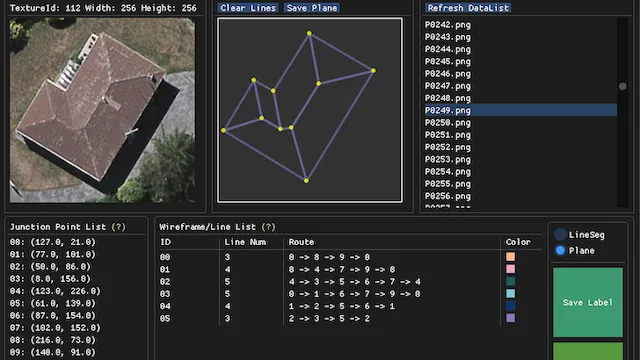
历史项目(2020 年 8 月),为满足 Wireframe Detection 的需要制作的标注工具。当时迫切需要一种符合目标 CNN 监督训练的高效合理的标注工具,用于快速生产平面实例几何标注数据集。需要下列核心功能:
- 单独针对“点”(Point)进行精确位置标注,以二维坐标给出,并赋序号;
- 从已标注的点拉出“线”(Line)并与其它点连接,线段以点的序号序对表示;
- 以点为单位进行回路(Circle)标注,对应于每个平面,且能够记录回路的标注顺序,构成有向图;
- 从已标注的平面线框(Plane Wireframe)直接生成每个平面对应的掩模标注;
- 将原始图像、掩模标注、线框标注、标注参数等信息直接序列化为紧凑的数据形式,方便程序加载。
于是,标注工具 LabelFM 就诞生了。
Description
LabelFM is a graphical image annotation tool, mainly for image wireframe labeling. It provides two kinds of annotation mode (Line Segment and Plane), which is very helpful for creating different types of geometry data.
The GUI used in LabelFM is originally Dear ImGui, a C++ GUI library. For fast development, a Python binding pyimgui is utilized in this project. Currently, the whole project is a Python implementation.
Requirements
The Dependency of this project is almost the same as pyimgui. In this project, the GLFW3 is used as the rendering backend.
The open source Image library Pillow, the computer vision library OpenCV and the python fundamental package NumPy are also needed.
Examples
Before line segment annotation, you need to click the loaded image to add point data.
Note that the point item can be selected to help you check point annotations.
This Annotation Tool provides two kinds of mode, one for general line segment annotation, the other for plane wireframe annotation. You need to select the corresponding radio button to change the mode.
After annotation, click Save Label button to save your label of the current image.
To start another image annotation, click Reset Label button to clear all the current labeling data.
项目现状
该项目早已不再迭代和维护,但基本能力已经完全满足需求。
在 LLM 时代,已经没有什么使用价值了,如果能起到一点参考作用就很好了。
仓库在 GitHub 开源(MIT license)。